Walk into most Delhi NCR offices and try booking a meeting room. You’ll find two patterns. Small rooms (4-6 people) are overbooked solid, booked by people who don’t show up, or occupied by someone taking a phone call. Large boardrooms (12-16 people) sit empty most of the day except for Thursday’s weekly team meeting.
The mismatch isn’t accidental. It’s what happens when meeting room design follows templates rather than actual usage data. Someone decided “we need conference rooms” without asking how many people typically meet, how often, or what they’re trying to accomplish.
Then there’s the hybrid problem. Half your team joins via video. The camera points at the back of people’s heads or sits too low showing mostly table. Remote participants can’t hear anyone except whoever’s next to the mic. The in-room whiteboard is invisible to people on Zoom. After 30 frustrating minutes, everyone gives up and reschedules for when people can meet properly—which defeats the entire point of hybrid flexibility.
Orange Offices treats meeting room design as workflow infrastructure. The research says 59% of meetings involve 2-3 people according to CBRE studies, yet most offices build rooms for 8-12. Companies report meeting fatigue, scheduling conflicts, and remote workers feeling like second-class participants—all solvable through better spatial planning and technology integration.
For Delhi NCR offices where real estate costs ₹80-150 per square foot monthly and collaborative work drives business outcomes, meeting rooms that actually match how people work deliver returns through better decisions, faster project velocity, and yes, dramatically less scheduling frustration.
Why Most Meeting Rooms Fail Three Ways Simultaneously
Problem 1: Size Mismatch
Standard template: build 3-4 large rooms (10-12 people), maybe one small room (4 people), call it done. Reality: most meetings are 2-4 people. Those three large rooms sit empty whilst teams fight over the one small space or crowd into someone’s desk area having conversations that disturb everyone nearby.
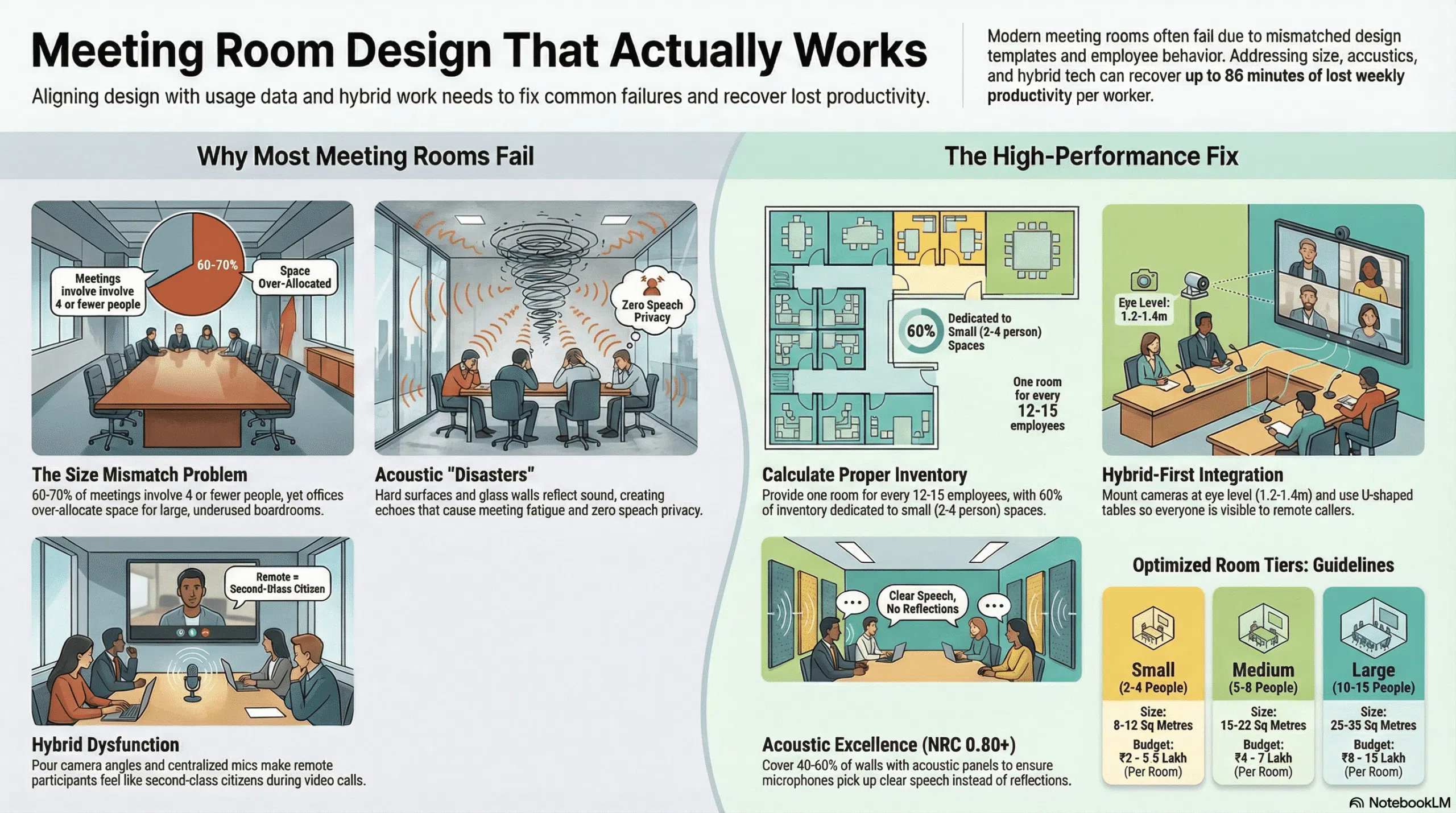
Research consistently shows 60-70% of meetings involve 4 or fewer people. Another 20-25% need space for 5-8 people. Only 10-15% actually require rooms seating 10+. Your room inventory should reflect this distribution, not aspirational boardroom aesthetics.
Problem 2: Acoustic Disasters
Glass walls look great. They let light through, create visual openness, maintain that modern office aesthetic. They also transmit sound brilliantly in both directions. The team in the meeting room hears everything from outside. People working nearby hear every word from inside. Speech privacy: zero. Concentration: impossible.
Then there’s internal acoustics. Hard surfaces everywhere—glass, table, whiteboard walls. Sound bounces around creating that echo-y, exhausting acoustic environment where video calls sound terrible and people strain to hear each other even in person.
Problem 3: Hybrid Dysfunction
Camera mounted on the wall at standard monitor height (roughly 1.2 metres). People sit at table height (0.75 metres). Camera captures mostly the top of heads and table surface. Remote participants see nothing useful.
Microphone sits in centre of table. Person at far end speaks, sounds like they’re in another building. Person next to mic speaks, blows out everyone’s eardrums. No automatic switching, no echo cancellation, just whoever booked the room wrestling with unmuted mics and hoping for the best.
Whiteboard or screen positioned so in-room people can see but camera angle captures it at 45 degrees with glare. Remote participants squint uselessly at illegible scribbles.
Room Sizing That Matches Reality
Standard industry guidance says 20-25 square feet per person (2-2.5 square metres). That includes seating space, table, circulation, and equipment. Here’s how that translates practically.
Small Rooms (2-4 People): 8-12 Square Metres
This is your highest-demand category. For a 100-person office, you need 5-7 of these minimum. Uses: one-on-ones, quick project check-ins, phone calls requiring privacy, candidate interviews, sensitive HR conversations.
Furniture: small table (1.2m x 0.8m), 4 chairs, wall-mounted screen, simple video setup. The goal is quick in/out, not lingering comfort. Keep these minimal so people don’t camp in them all day.
Medium Rooms (5-8 People): 15-22 Square Metres
Your second-highest demand. For 100 people, need 3-4 rooms. Uses: team meetings, client presentations, working sessions, hybrid standups.
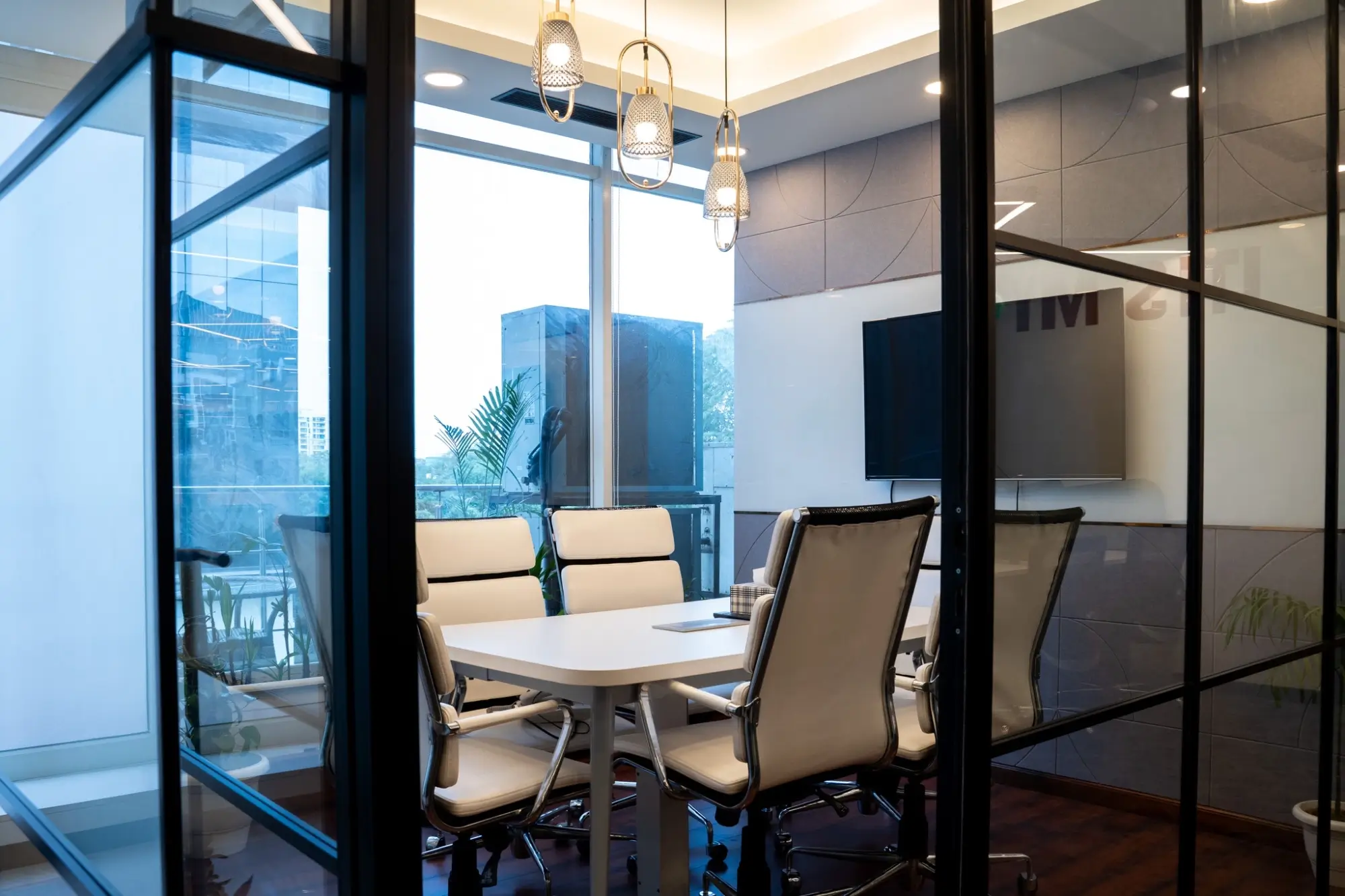
Furniture: table seating 6-8 (2m x 1m minimum), proper video conferencing setup with eye-level camera, dual screens (one for content, one for remote participants), acoustic treatment on walls and ceiling.
Large Rooms (10-15 People): 25-35 Square Metres
Lower utilisation but essential for specific needs. For 100 people, need 1-2 maximum. Uses: all-hands meetings, client pitches with multiple stakeholders, training sessions, board meetings.
Furniture: large table (3m x 1.5m), 12-16 chairs, advanced AV (multiple cameras, ceiling mic array, large displays), dedicated presentation area, acoustic treatment throughout.
Calculation for Your Office
Actual formula: for every 12-15 employees, provide one meeting room (all sizes combined). So 100 people need roughly 7-8 total rooms distributed as: 4-5 small, 2-3 medium, 1 large.
This assumes hybrid schedules where not everyone’s in office simultaneously. If your team is 80%+ in-office daily, increase to one room per 10 employees.
Hybrid Meeting Design That Doesn’t Frustrate Everyone
The whole point of hybrid is flexibility. People join from anywhere. It only works if remote and in-room participants have roughly equal experience.
Camera Positioning
Eye level. Always. For seated meetings, that means cameras mounted 1.2-1.4 metres from floor—not at ceiling height looking down, not at knee level looking up. Cameras should face across the table, not down the length of it.
For rooms seating 6+, use wide-angle cameras (120-degree field of view) with automatic framing that zooms to active speakers. Person stands to present at whiteboard, camera follows. Person at end of table speaks, camera adjusts frame. This costs more but solves the “can’t see who’s talking” problem that plagues basic setups.
Audio That Doesn’t Make People Scream
Ceiling-mounted mic arrays work better than table mics for rooms over 12 square metres. They use beamforming technology—multiple microphones working together to focus on whoever’s speaking whilst filtering out ambient noise.
Pair with acoustic treatment (more on this below). Even great mics sound terrible in echo-y rooms. The audio processing has to work with room acoustics, not fight them.
For small rooms under 10 square metres, quality speakerphone devices (the puck-style units) work fine. They’re simpler, cheaper, and adequate when everyone’s within 2 metres of the mic.
Display Strategy
One screen isn’t enough for hybrid. You need two.
Screen 1: Shows remote participants. Mounted at eye level, large enough that people in-room can see faces clearly (minimum 55-inch for medium rooms, 75-inch+ for large rooms).
Screen 2: Shows shared content—presentations, documents, whatever you’re actually discussing. Can be slightly smaller since it’s for reference not eye contact.
Position both where in-room participants can glance between screens and the person next to them without neck strain. The classic mistake is mounting everything on one wall, forcing half the room to crane around.
Furniture Layout for Cameras
U-shaped or V-shaped tables work better than rectangular for hybrid. Everyone faces roughly towards the camera instead of sitting perpendicular to it. Remote participants see faces not profiles.
Guitar-pick-shaped tables (one curved end, one flat) have become popular because they solve this naturally—the curve faces the camera, everyone’s visible.
Avoid rectangular tables running perpendicular to the display wall. Half the participants sit with backs to camera creating the “can’t see anyone” problem.
Acoustic Treatment That Makes Meetings Not Exhausting
Meeting rooms need higher acoustic performance than general office areas. Target NRC 0.80-0.90 on walls and ceilings.
Why This Matters
Echo and reverberation create cognitive load. Your brain works harder to process speech when there’s acoustic interference. After an hour in a bad acoustic environment, people feel drained even if the meeting itself wasn’t difficult.
For hybrid meetings, acoustics matter even more. Microphones pick up reflected sound, not just direct speech. Poor room acoustics create that hollow, echo-y quality on calls that makes people sound like they’re in a bathroom.
Treatment Zones
Ceiling: Full coverage acoustic tiles or baffles. NRC 0.80 minimum. This is your largest surface area and handles most overhead reflection. For office design in Delhi NCR, mineral fibre tiles work well at ₹180-350 per square metre installed, handle humidity reasonably, and integrate with standard ceiling grids.
Walls: 40-60% coverage with acoustic panels. Focus on wall opposite the entry door (where people face) and side walls. Leave glass wall if natural light penetration is important, but treat the other three surfaces heavily.
Furniture: Upholstered chairs add absorption. Fabric-wrapped acoustic panels can match your branding colours whilst delivering NRC 0.85-0.95 performance.
Floor: Carpet tiles with acoustic backing in rooms over 15 square metres. For smaller rooms, standard carpet works. Hard flooring (wood, tile) reflects sound terribly and should be avoided unless you’re adding significant wall/ceiling treatment to compensate.
Glass Walls and Sound Isolation
If you must have glass walls for light or aesthetics, double-glaze with acoustic laminate. Standard single-pane glass has terrible sound transmission class (STC 28-30). Proper acoustic glass reaches STC 40-45, providing actual speech privacy.
Alternative: Use glass on one wall only, treat the other three walls properly, and accept reduced but not zero sound transmission. It’s a compromise between openness and acoustic function.
Technology Integration Without Complexity
Equipment needs to work without IT support on every call.
One-Touch Start
Walk in, tap panel mounted by door, meeting room system powers on, camera activates, displays wake up, microphones go live, Zoom/Teams room launches. No cables, no laptop setup, no “can everyone hear me?” for 10 minutes.
This requires integrated room systems (Zoom Rooms, Microsoft Teams Rooms, or similar). Initial costs are higher—₹2.5-4 lakh for medium room setup including displays, camera, audio, control panel. But the productivity recovery from not wasting meeting time on tech troubleshooting pays back in months.
Cable Management That Doesn’t Create Trip Hazards
Power and data at the table via flush-mounted ports or cable management boxes. HDMI, USB-C, and power accessible without crawling under furniture.
For bespoke office interior design in Delhi NCR, integrate cable routing during furniture specification. Custom conference tables can include built-in power/data runs that keep surfaces clean.
Wireless Presentation
People should be able to share screens without physical cables. Modern wireless presentation systems let anyone share from laptop, tablet, or phone. Solves the “who has the right dongle” problem and the “why won’t my Mac connect” frustration.
Common Mistakes That Waste Money
Mistake 1: Building What Looks Good Rather Than What Works
Large impressive boardroom with mahogany table, leather chairs, dramatic lighting. Costs ₹15-20 lakh to build. Gets used twice monthly for board meetings. Sits empty otherwise because it’s intimidating and oversized for normal team meetings.
That money could have built 3-4 properly equipped medium rooms that would run 60-80% utilisation.
Mistake 2: Skimping on AV in Hybrid Era
“We’ll just use laptops” sounds cost-effective until you watch people struggle with laptop mics that pick up keyboard noise, laptop cameras aimed wrong, laptop speakers that distort, and meetings that start 10 minutes late whilst someone troubleshoots.
Basic integrated room systems cost ₹2.5-3 lakh for 6-person rooms. That’s roughly 3-4 hours of time across 10 people monthly to break even via reduced meeting friction. Most companies hit break-even in 4-6 months.
Mistake 3: Ignoring Lighting for Video
Conference rooms need different lighting than general office space. Video cameras need even, balanced light on faces. Standard ceiling lights create harsh shadows, especially overhead fixtures that light the table but not people’s faces.
Add front-facing light sources (wall-mounted LED panels, properly positioned ceiling lights) that illuminate people without glare. Budget ₹40,000-80,000 for proper meeting room lighting. It transforms video call quality.
Mistake 4: No Room Booking System
People book rooms they don’t use. People can’t find available rooms. Rooms sit “occupied” by ghost bookings whilst teams search for space.
Digital booking panels outside each room solve this. They show current status, upcoming bookings, and let people book on the spot or via app. Most also integrate auto-release—if nobody shows within 10 minutes, the booking cancels automatically.
Cost: ₹25,000-45,000 per room for panels + software. ROI comes through dramatically reduced scheduling friction and improved utilisation.
Phasing and Budget Reality
Full meeting room renovation isn’t realistic for most offices. Phased approaches work.
Phase 1: Fix the Worst Problems (₹3-6 Lakh)
Identify your most-used rooms. Add basic acoustic treatment (ceiling tiles, wall panels). Improve lighting. Install decent speakerphone systems. This handles 60-70% of complaints for modest investment.
Phase 2: Upgrade Hybrid Capability (₹8-15 Lakh)
Two most-used rooms get full integrated AV systems with proper cameras, mic arrays, dual displays, one-touch operation. These become your “reliable hybrid meeting rooms” that people book specifically for important external calls.
Phase 3: Expand and Optimise (₹15-30 Lakh)
Build out full room inventory based on actual meeting patterns. Convert underused large room into two medium rooms. Add more small rooms in high-traffic areas. Full AV integration across priority spaces. Digital booking system throughout.
Total timeline: 8-16 months depending on office size and budget cycles.
Meeting Rooms as Decision Infrastructure
Delhi NCR’s commercial offices pack expensive talent into expensive real estate to accomplish work that increasingly happens through meetings—team coordination, client presentations, project planning, problem-solving sessions.
When meeting rooms fail, you’re not just causing frustration. You’re creating friction in the actual workflows that drive business outcomes. Decisions get delayed because nobody can find space. Remote team members disengage because they can’t hear or be heard. Projects stall because hybrid collaboration doesn’t work.
Orange Offices treats meeting rooms as critical infrastructure that enables work, not just boxes on a floor plan that meet regulatory square metre requirements. We measure real usage patterns, identify specific problems (size mismatch, acoustic issues, hybrid dysfunction), and design rooms that match how teams actually work.
The physics don’t care about budget constraints. Sound either absorbs or reflects. Cameras either show faces or don’t. Rooms either fit typical meeting sizes or people crowd in uncomfortably. But implementation can be phased, prioritised, and adapted to what your company needs rather than what generic templates assume.
Ready to fix your meeting rooms properly? Get in touch with Orange Offices to discuss office interior design in Delhi NCR that supports how work actually happens.